Interviewer
Overview
Interviewer is an AI-powered interview practice application designed to help candidates prepare for real job interviews through voice-enabled mock sessions. Built with a local-first privacy approach, it runs entirely on your own hardware with no data ever leaving your machine.
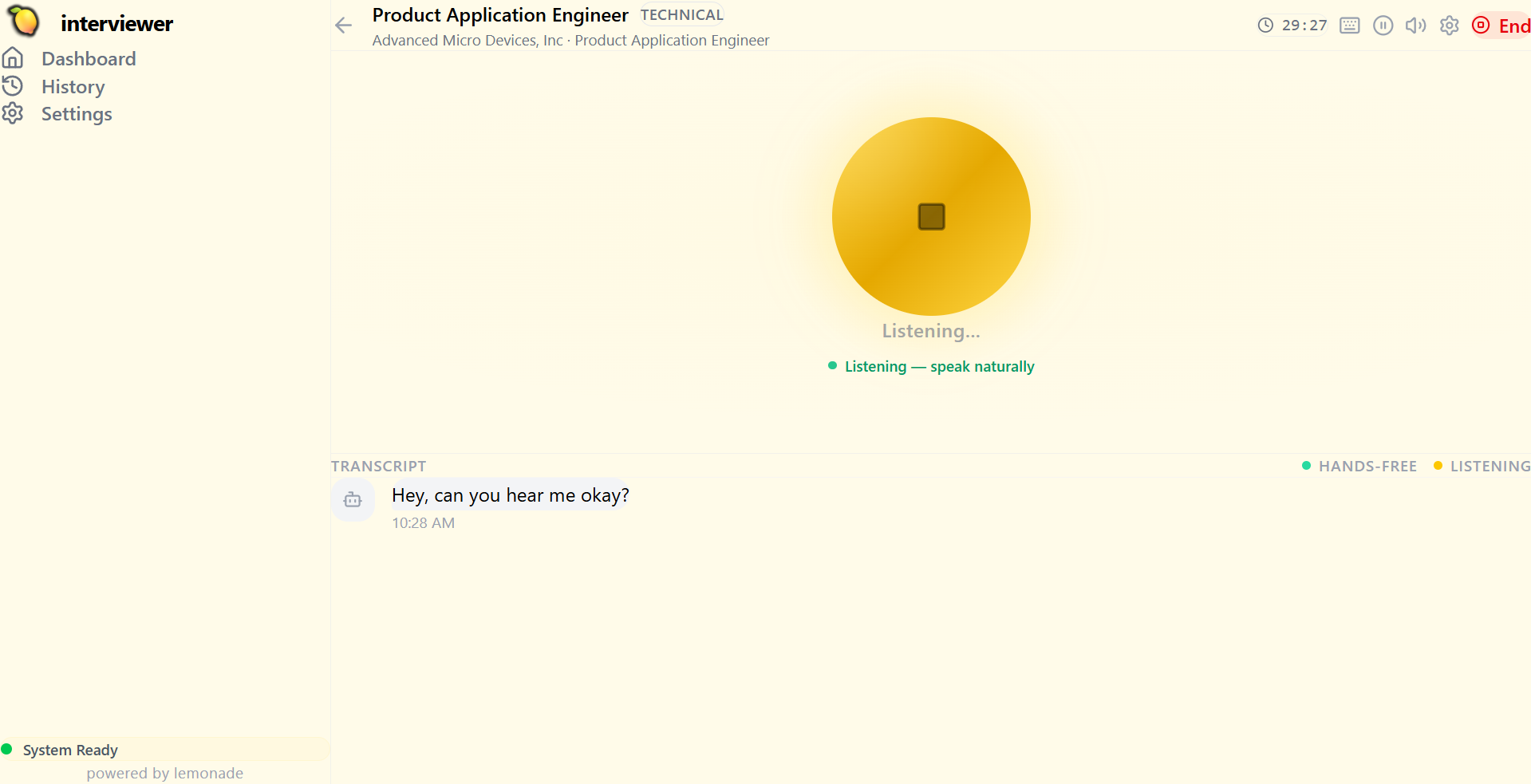
The application generates dynamic, context-aware interviewer personas based on actual job descriptions and your resume, conducts multi-phase technical and behavioral interviews with real-time voice interaction, and provides comprehensive, actionable feedback.
Features
- Voice-Enabled Interviews - Realistic interview simulation with speech-to-text (ASR) and text-to-speech (TTS)
- Local AI Models - Runs entirely on your hardware via Lemonade Server with no cloud dependencies
- Smart Document Extraction - AI-powered parsing of resumes and job descriptions
- Dynamic Persona Generation - Creates tailored interviewer personas based on job/role
- Comprehensive Feedback - Detailed performance analysis with actionable insights
- Privacy-First - All data stored locally in JSON format
- Cross-Platform Desktop App - Electron-based for Windows, macOS, and Linux
Setup
Prerequisites
- Install Lemonade Server by following the Lemonade Server Instructions
- Node.js 20+ - Download from nodejs.org
- Git - For cloning the repository
1. Clone and Install Dependencies
git clone https://github.com/lemonade-sdk/interviewer.git
cd interviewer

# Install Node.js dependencies
npm install
2. Start Lemonade Server
Start Lemonade Server using the desktop app or CLI:
# Using the desktop app - click the lemon icon (LemonadeServer.exe on Windows, lemonade-tray on macOS/Linux)
# Or using the CLI to start the HTTP server directly:
lemond
3. Pull Required Models
Interviewer uses multiple AI models for different capabilities. Pull the recommended models:
# LLM for interview logic and feedback (recommended: Qwen3-Coder-30B-A3B-Instruct-GGUF)
lemonade pull Qwen3-Coder-30B-A3B-Instruct-GGUF

# Whisper-Base for speech-to-text (automatic transcription)
lemonade pull Whisper-Base

# Kokoro for text-to-speech (natural voice synthesis)
lemonade pull kokoro-v1
4. Run Interviewer
# Development mode
npm run dev

# Or build for production
npm run build
npm run build:electron
Model Recommendations
Based on testing, the following models work well with Interviewer:
| Capability | Recommended Model |
|---|---|
| LLM (Interview Logic) | Qwen3-Coder-30B-A3B-Instruct-GGUF |
| ASR (Transcription) | Whisper-Base |
| TTS (Voice) | kokoro-v1 |
Hardware Requirements: - Tested on AMD Strix Halo with 128GB RAM - Minimum 32GB RAM recommended for larger models - GPU acceleration recommended for faster responses
How It Works
Interviewer leverages Lemonade Server for all AI inference:
- Resume/Job Parsing - Uses LLM to extract key skills, requirements, and context
- Persona Generation - Creates an interviewer persona tailored to the job description
- Question Generation - Dynamically generates relevant technical and behavioral questions
- Voice Processing - Uses Whisper for transcription and Kokoro for natural voice synthesis
- Feedback Analysis - Provides detailed feedback on your responses with improvement suggestions
Architecture
Interviewer App (Electron + React)
        |
        | HTTP API (localhost:13305)
        v
Lemonade Server
        |
        +-- LLM (llama.cpp) --> Interview logic, feedback
        +-- Whisper ---------> Speech-to-text
        +-- Kokoro ----------> Text-to-speech
Troubleshooting
Model Loading Issues
If models fail to load, check that Lemonade Server is running:
lemonade status
Audio Not Working
Ensure your microphone and speakers are properly configured in your system settings.
Slow Response Times
- Ensure you have enough RAM (32GB+ recommended for Qwen3-Coder-30B)
- Enable GPU acceleration if available
- Close other resource-intensive applications
Repository
- Source Code: github.com/lemonade-sdk/interviewer
- Issues: github.com/lemonade-sdk/interviewer/issues
License
MIT License - see the LICENSE file for details.